Unocking/activation IgniteColorCine

magix_dr wrote on 10/27/2025, 6:48 AM

After installing MEP2022 on my new laptop, it was time to install the add-ons.
I installed and activated some of these add-ons (proDAD) without any problems. However, I am having trouble activating IgniteColorCine Magix Pack.
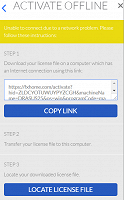
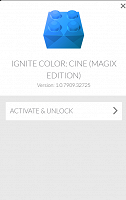
A screen appears asking me to unlock and activate this add-on and download the certificate. I am redirected to the website artlist.io but I do not know where to find the certificate, even though:
1. I have an internet connection and do not know why a message on a yellow background appears saying that there is no connection.
2. I already have the registration key (it is also displayed in MEP2022), but I do not know where to enter it to activate this plug-in.


Rgds Darek
 

Comments

Reyfox wrote on 10/28/2025, 8:38 AM

Artlist does own Ignite and FXHome. They stopped updating Ignite several years ago sadly.

If you find a solution (or anyone has one), I would be interested in it. But again, sadly, Artlist killed everything Hitfilm related.

magix_dr wrote on 10/29/2025, 4:45 AM

Done. Today, I tried to activate IngineColorPack again. Interestingly, everything went smoothly today. The window with yellow text about no internet connection did not appear (although yesterday I definitely had internet access too). I had to log in and enter the activation key. The system detected that this key was assigned to my old laptop, so it asked me if I wanted to deactivate it on the old laptop and activate it on the new one. After a while, everything worked fine in MEP2022 on my new laptop.
The matter is closed for me – although I wonder why yesterday it detected a lack of internet connection and directed me to the artlist homepage?


Rgds Darek

Reyfox wrote on 10/29/2025, 8:27 AM

Thanks for the update! Glad everything is working now for you.