MEP 2016 Plus - Trying To Copy Media Onto New Project

CarpentersMate wrote on 4/25/2026, 6:37 PM

Hello to all my old friends! Hope all is well ...

I'm going on 78, and still using MEP 2016 Plus (for now). Fer the life of me still haven't been able to successfully copy media from one project into a NEW fresh project. Currently have a glitch that seemed to occur after I tried to create a Title? Was never sure if MEP allows you to view 2 project tabs at the same time? Could never figure that out nor why I always get the prompt 'Clip Board Empty'? Here's the strange glitch that appears everytime I select the Play Head. And note the Hightlighted Media I'm trying to paste into a NEW project.
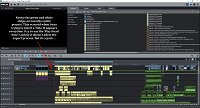
Thank you any ideas? Here's what I've completed so far: http://www.media-historical.com/Artemis-II.mp4

My Best - Mike

Last changed by CarpentersMate

For Magix: Running Windows 10 Professional 64 bit - Dell Precision Workstation 3620 - i7 7700K 4.20 GHz Processor - 32GB Memory - (onboard video), Asus PCI Sound Card - iGPU - Two Twin esata 2TB External Drives. And for other software: Two Mac Pro Desktops with PCI & PCIe Soundcards & nVidia GeForce Graphics Cards - Mimimum memory of 16GB with #10 2TB esata Twin External Drives.


Comments

AAProds wrote on 4/25/2026, 10:21 PM

@CarpentersMate

Looking good there, Mike! That looks like a very detailed project; and so far, and excellent video. That really was a special event.

The green line is the volume curve; hide it by right-clicking on the audio object and unticking "Volume curve".

You can't have two projects open at the same time, but you can have multiple movies open. The movies are the tabs you see. In yours, there's only one movie, "Moon Thing Video".

Copy to a new project

If you want to copy an object from there to a NEW project ie a blank project, "copy" (as per Windows CTRL C or right-click) , click the + sign to open a new movie tab, then click in the timeline area and paste it.

Then, just delete the first movie tab and do a "Save Project As..." and give your new project a name. Your title (or whatever you copied) will be in that new project/movie.

Copy to an existing project

If you want to copy an object from one project to another, already-existing project (as opposed to a "New" project), Just go through the motions of opening the second project. Magix will ask if you want to close the current project; answer "Add new project". The second project (with it's movie/s) will open in a new tab/s.

Then just copy your objects from the first project's movie to the second project's movie, then delete the first project's movie. You'll be left with the second project with the copied objects in the movie. "Save" as necessary.

Yet another option is to copy the objects to a new movie (new tab created with the +), paste your objects in that new movie, then File>manage project>Export movie file. The movie will be exported as an MVD (a Magix "movie", as opposed to a Magix Project [MVP], which you can then import into any other project over and over.

If it is a title that you want to reuse, it would be simpler to just save it as a title template for re-use. On the title, right-click> Save as Title Template.

Another trick to know using title templates is that, as long as a title is involved, you can save all-manner of objects and effects using the "Save as Special Effect" command. For example, a title with an image/video and soundtrack. Highlight all the objects (which must include a title). Right-click on the title then choose "Save as special effect". It gets saved in the "My Own" Templates folder. Drag it down onto the timeline and you'll get the title, audio and image/video all together. This is very handy if you have a complicated intro with a title.

I had a chuckle when the commentator said "ride the most powerful rocket" then did a long pause when he remembered that Starship is the most powerful rocket. That aside, is was a terrific effort by NASA. I reckon the best shot was the airborne shot from the side (1:07 on your movie), which, I believe, was taken from a Cessna orbiting the pad.

All my forum comments are based on or refer to my System 1.

System 1

Windows 11 v23H2 severely modified by Openshell and ExplorerPatcher

Power supply: 850W Cooler Master (should have got modular)

CPU: Intel i7 13700K running at 3400mhz, cooled by a Kraken 2x140mm All In One liquid cooler.

RAM: 64gb (2x32gb sticks) G.Skill "Ripjaws" DDR4 3200Mhz

GPU 1: iGPU UHD 770

GPU 2: NVidia RTX 3060Ti Windforce 8gb

C drive: NVME 500gb

Bluray Burner: Pioneer BDR-212D

Various other SSD and HDDs.

Monitor: 27"/68cm Samsung, 2560 x 1440, 43 pixels/cm.

MEP 2021 version 20.0.1.80

Magix Video Deluxe 2026 Ultimate (although it comes up as "Premium").

Magix Video Easy version 7.0.1.145

System 2

(Still in use for TV and videotape capture)

Windows 10 Home Version 2009

CPU: i5-750 at 2670mhz with 12gb RAM

Onboard IEEE1394 (Firewire) port

GPU: ATI Radeon HD 4770 (512mb) which is ignored by MEP

Hard drives: C Drive 256gb SSD, various other HDDs.

Monitor: Dell 22"/56cm, 1680x1050, 35 pixels/cm

Movie Studio 2023

Movie Studio 2024

VPX 12

System 3

Lenovo Yoga laptop

Windows 11

CPU i5-8250U (1,6ghz)

8GB DDR4 2400 RAM

GPU iGPU UHD620

2TB NVME HDD

Video Deluxe 2026