Stopping pop-ups from MAGIX on PC Boot

Comments

rickduley wrote on 1/5/2025, 4:53 PM

Two weeks down the track and the MAGIX Grinch is leaving me alone. I haven't been visited by a pop-up since my last post. That's all very nice, but to achieve that I had to remove everything MAGIX from my PC except the "Bare Bones" Video Pro X16.

That's satisfactory in that I can still do some work WITH THE PRODUCT I PAID FOR but I am left with a nasty taste in my mouth because there are some functionalities on X16 that I can no longer use. Why am I expected to PAY FOR SOMETHING and then throw most of is away to avoid being pestered with pop-ups?

--------------------------------------------
Rick Duley
North Perth,
Western Australia
--------------------------------------------

My machine is Intel(R) Core(TM) i5-8500 CPU @ 3.00GHz   3.00 GHz; 64-bit operating system, x64-based processor, Nvidia GT 730 GPU
Edition    Windows 11 Pro; Version    22H2
Installed on    ‎3/‎04/‎2024 OS build    22621.3447
Experience    Windows Feature Experience Pack 1000.22688.1000.0

rickduley wrote on 5/28/2026, 7:45 PM

Hi all

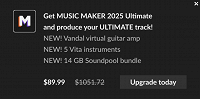
The Grinch is back. For the past couple of days I have been greeted by this (or similar)

This would appear to be a MAGIX ad so I am, again, going to blame MAGIX.

I have (just now) worked through this thread and checked that I have undertaken all the suggested remedies. I have. The Grinch is still back.

Who will rid me of this turbulent [pest]? 👺

--------------------------------------------
Rick Duley
North Perth,
Western Australia
--------------------------------------------

My machine is Intel(R) Core(TM) i5-8500 CPU @ 3.00GHz   3.00 GHz; 64-bit operating system, x64-based processor, Nvidia GT 730 GPU
Edition    Windows 11 Pro; Version    22H2
Installed on    ‎3/‎04/‎2024 OS build    22621.3447
Experience    Windows Feature Experience Pack 1000.22688.1000.0

SP. wrote on 5/29/2026, 2:27 AM

@rickduley It looks like this is loaded inside Video Deluxe or Pro X? There is usually an option inside the program settings to disable this.

rickduley wrote on 5/29/2026, 2:32 AM

You're right @SP. The problem is than none of the settings actually disable this.

--------------------------------------------
Rick Duley
North Perth,
Western Australia
--------------------------------------------

My machine is Intel(R) Core(TM) i5-8500 CPU @ 3.00GHz   3.00 GHz; 64-bit operating system, x64-based processor, Nvidia GT 730 GPU
Edition    Windows 11 Pro; Version    22H2
Installed on    ‎3/‎04/‎2024 OS build    22621.3447
Experience    Windows Feature Experience Pack 1000.22688.1000.0

SP. wrote on 5/29/2026, 2:51 AM

@rickduley Can you upload a screenshot where we can see, that you enabled the option to hide news in the program settings?

johnebaker wrote on 5/29/2026, 4:46 PM

@rickduley

Hi Rick

. . . . The problem is than none of the settings actually disable this . . . .

They won't, from your image that looks like an Ad rather than a 'news' article from within the program.

The ad should have a grey gear icon bottom left of the ad pane where you can choose not to show ads.

Check that Magix Cloud import has not been re-installed.

John EB

Last changed by johnebaker on 5/29/2026, 4:48 PM, changed a total of 1 times.

VPX 17, Video deluxe 2026, and earlier versions MEP 2015 and 2016, Music Maker Premium 2026.

PC - running Windows 11 25H2 Professional on Intel i7-8700K 3.2 GHz, 16GB RAM, RTX 2060 6GB 192-bit GDDR6, 1 x 1Tb Sabrent NVME SSD (OS and programs), 2 x 4TB (Data) internal HDD + 1TB internal SSD (Work disc), + ext backup HDDs.

Laptop - Lenovo Legion 5i Phantom - running Windows 11 25H2 on Intel Core i7-10750H, 16GB DDR4-SDRAM, 512GB SSD, 43.9 cm screen Full HD 1920 x 1080, Intel UHD 630 iGPU and NVIDIA GeForce RTX 2060 (6GB GDDR6)

Sony FDR-AX53e Video camera, DJI Osmo Action 3 and Sony HDR-AS30V Sports cams.

rickduley wrote on 5/29/2026, 8:53 PM

Thanks @johnebaker


No grey bears. But there is some good news ...

@SP. wanted to see the "Hide News" pane

and it is set to hide the news.
The good news is that I have started VPX16 twice this morning and have been free of the curse. I haven't adjusted anything and yesterday I was definitely cursed.


Computers!
Bah!
Humbug!😵

--------------------------------------------
Rick Duley
North Perth,
Western Australia
--------------------------------------------

My machine is Intel(R) Core(TM) i5-8500 CPU @ 3.00GHz   3.00 GHz; 64-bit operating system, x64-based processor, Nvidia GT 730 GPU
Edition    Windows 11 Pro; Version    22H2
Installed on    ‎3/‎04/‎2024 OS build    22621.3447
Experience    Windows Feature Experience Pack 1000.22688.1000.0