WAVES VST Plug-in inssue

raquii wrote on 1/12/2026, 2:03 PM

We had to do a deep cleaning of our Windows 10. As a result, many doubled files had to be deleted. So we had to reinstall new DAW's and VST's, and even Printing drivers... uhg. Sorry for the dramatics...

Anyhow, we are unable to find our WAVES plugins in our updated Acid Pro 11 DAW on our updated and security extended covered Windows 10. We tried rescanning however the issue still persists. The knowledge base of WAVES assistance is so limited.

We followed the instructions in the article https://www.waves.com/support/how-to-find-your-plugins-in-acid-pro-7-0

It did nothing for us.

Trying to default a VST3 folder as listed when scanning for plugins (C:\Program Files\Common Files\VST3) seemed to make issues worse.

Please review this attachment...
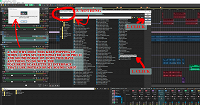
What a mess... HELP?

Comments

SP. wrote on 1/12/2026, 3:23 PM

@raquii Inside the Acid program folder there are multiple audio_plugin_scan_server exe files. These are responsible for the plugin scan. Acid hasn't been updated for many years so there are compatibility issues with newer plugins.

Some users found out that if you install new Magix software and copy their audio_plugin_scan_server exe files into the old program folders it solves some of these compatibility issues but I cannot guarantee that it will work with the newest version of Waves. Waves is somewhat non-standard, they have a list of officially supported audio softwares. I don't know why they are so limited, maybe they don't completely adhere to the VST standard.

For example, you can download and install the free trial version of Music Maker 2026 or use your version of Sound Forge Pro 18 and get the exe files from it.

Make sure you select the Focusrite ASIO driver in the program preferences of Acid. Sound Forge usually works fine with Microsoft Sound Mapper.