WAVES VST Plug-in inssue

raquii wrote on 1/12/2026, 2:03 PM

We had to do a deep cleaning of our Windows 10. As a result, many doubled files had to be deleted. So we had to reinstall new DAW's and VST's, and even Printing drivers... uhg. Sorry for the dramatics...

Anyhow, we are unable to find our WAVES plugins in our updated Acid Pro 11 DAW on our updated and security extended covered Windows 10. We tried rescanning however the issue still persists. The knowledge base of WAVES assistance is so limited.

We followed the instructions in the article https://www.waves.com/support/how-to-find-your-plugins-in-acid-pro-7-0

It did nothing for us.

Trying to default a VST3 folder as listed when scanning for plugins (C:\Program Files\Common Files\VST3) seemed to make issues worse.

Please review this attachment...
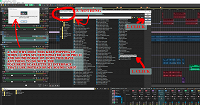
What a mess... HELP?

Comments

SP. wrote on 1/12/2026, 3:23 PM

@raquii Inside the Acid program folder there are multiple audio_plugin_scan_server exe files. These are responsible for the plugin scan. Acid hasn't been updated for many years so there are compatibility issues with newer plugins.

Some users found out that if you install new Magix software and copy their audio_plugin_scan_server exe files into the old program folders it solves some of these compatibility issues but I cannot guarantee that it will work with the newest version of Waves. Waves is somewhat non-standard, they have a list of officially supported audio softwares. I don't know why they are so limited, maybe they don't completely adhere to the VST standard.

For example, you can download and install the free trial version of Music Maker 2026 or use your version of Sound Forge Pro 18 and get the exe files from it.

Make sure you select the Focusrite ASIO driver in the program preferences of Acid. Sound Forge usually works fine with Microsoft Sound Mapper.

raquii wrote on 1/15/2026, 1:28 PM

Man, Thank you for that info SP. It really looks like that problem is entirely with WAVES, so I got a live agent scheduled to work on my PC remotely next week. Again, thanks for that info above man.

emmrecs wrote on 1/16/2026, 3:25 AM

@raquii

@SP. wrote: "maybe they don't completely adhere to the VST standard."

Unfortunately, they are rather infamous for precisely this!

Not too long ago Adobe raised an issue with Waves because what was then the latest release of various plugins failed to load or run in Adobe's flagship audio editor, Audition, (used by a very large number of radio stations worldwide). Waves were then "forced" (by the sheer number of users affected by the problem, and the pressure from Adobe) to change their code to make it compliant with the VST Standard then in place.

Perhaps their earlier behaviour of non-compliance has resurfaced!

Jeff
Forum Moderator

Win 11 Pro 64 bit, Intel i7 14700, 32 GB RAM, NVidia RTX 4060 and Intel UHD770 Graphics, Audient EVO 16 audio interface, VPX, MEP, Music Maker, Vegas Pro, PhotoStory Deluxe, Xara 3D Maker 7, Samplitude Pro X7 Suite, Reaper, Adobe Audition CC, 2 x Canon HG10 cameras, 1 x Canon EOS 600D, Akaso EK7000 Pro Action Cam

raquii wrote on 1/19/2026, 12:06 PM

I was wrong. I was completely wrong. My apologies to SP and emmrecs, but the problem is now 100% Acid Pro's fault. SP mentioned above, "...Acid hasn't been updated for many years so there are compatibility issues with newer plugins...." and he hit it right on the nail.

Today, WAVES was great. WE made an appointment, and they did a virtual hands-on into my computer using their TeamViewer software. They did A LOT of troubleshooting, only to find, ACID PRIO has not bothered to update their update in plugin/vst compatibility.

I'm pretty sure Acid Pro has no virtual tech support like WAVES does. If that's the case, after using Acid Pro for nearly 20 years, it looks like I forced to flush my $186.54 update down the toilet... and banish myself over to REAPER.

I don't think I can wait until Acid Pro catches up with this issue. You see, I'm an educator and producer. This is how I make a living, and I can't afford to be a part of a DAW that doesn't support their consumers... I'm feeling a little defeated here...😞 Help?

SP. wrote on 1/19/2026, 12:39 PM

@raquii Have you tried to copy the audio_plugin_scan_server exe files from the Sound Forge 18 Pro program folder to the Acid Pro 11 program folder like I suggested above? Be sure to make a backup of the files in the Acid program folder first, just in case.

raquii wrote on 1/19/2026, 6:54 PM

Well, I'm kind of worried about doing that since I can't exactly find what you're describing. I'm the kind of artist that need step by step guidance. I think I found them, but honestly SP, I just don't trust myself. I'll see if I can give it another go.

raquii wrote on 1/20/2026, 6:22 PM

SP, I think I did it wrong.... you said,

"...install new Magix software and copy their audio_plugin_scan_server exe files into the old program folders..."

So let me get this straight... remember, I need step-by-step instructions and I'm afraid your instructions above were a bit vague or unclear.. did you mean...


1. Install the new Magix Acid Pro 11

2. Go to Local Disk C: drive

3. Go to Program Files

4. Go to the Acid folder

5. Go to the new Acid Pro 11 folder

6. Scroll down and highlight ALL the "audio_plugin_scan_server.exe" files (I found 6 total)

7. move them into the Acid Pro 8 folder

8. restart the new Acid Pro 11 and see if the WAVES vst/plugins work now


...SP, does that look right to you?


SP. wrote on 1/21/2026, 5:33 AM

@raquii I'm not sure why you're trying to update Acid 8. I just modified your steps, just to make it clear what I mean.

1. Install Sound Forge Pro 18 or Music Maker 2026 (install the free trial version in case you don't own a full version)

2. Go to Local Disk C: drive

3. Go to Program Files

4. Go to the Sound Forge or Music Maker folder

5. Scroll down and highlight ALL the "audio_plugin_scan_server.exe" files (I found 6 total)

6. Copy and paste them into the Acid Pro 11 folder

7. restart the new Acid Pro 11 and see if the WAVES vst/plugins work now. Also try to rescan the VST paths in the program preferences.

raquii wrote on 1/21/2026, 11:01 AM

I'm not trying to update my Acid Pro 8 because I already did... I just read your sentence incorrectly, so...

boy am I glad I double checked with you first! OK, let me try that. Thank you SP

shkr wrote on 1/21/2026, 11:16 AM

I'm not sure for Sound Forge but Music Maker 2026 files work with Acid11. Followw SP. steps. You need to copy these files from Music Maker 2026:

audio_plugin_server.exe
audio_plugin_server_x64.exe
audio_plugin_scan_server_vst3.exe
audio_plugin_scan_server_vst3_x64.exe
audio_plugin_scan_server_vst2.exe
audio_plugin_scan_server_vst2_x64.exe

and put them in Acid folder. Of course first make a copy of original Acid files just in case. Unfortunately I don't know whether Waves will work because I don't use them...

raquii wrote on 1/21/2026, 1:27 PM

Just to be clear, I do not have Music Maker at all. Just Sound Forge 18 (x64)

Yes shkr, I found those 6 exe files, as I stated above.

To play it safe, I'll copy-n-paste them...

...from the Sound Forge folder into the Acid Pro 11 (x64) folder (as instructed by SP's last post above)

raquii wrote on 1/21/2026, 1:40 PM

OK, so I tried it... here's where I'm at... I noticed those exe files where already in the Acid Pro 11 folder, but I backed them up by moving them in to a separate folder. Then I put the Sound forge audio_plugin_server into the new Acid Pro folder... restarted, and it crashed.

raquii wrote on 1/21/2026, 1:41 PM

here's the crash report....

Extra Information
   File:                C:\Users\hp\AppData\Local\MAGIX\ACID Pro\11.0\dx_grovel_x64.log

Problem Description
   Application Name:    ACID Pro 11.0
   Application Version: Version 11.0.2 (Build 21)
   Problem:             Unmanaged Exception (0xc0000005)
   Fault Module:        C:\Program Files\ACID\ACID Pro 11.0\sfvstwrap.dll
   Fault Address:       0x00000000098C61FC
   Fault Offset:        0x00000000007661FC

Fault Process Details
   Process Path:        C:\Program Files\ACID\ACID Pro 11.0\acidpro.exe
   Process Version:     Version 11.0.2 (Build 21)
   Process Description: ACID Pro 11.0
   Process Image Date:  2022-12-14 (Wed Dec 14) 18:28:20
 

raquii wrote on 1/21/2026, 1:51 PM

OK, I put everything back the way it was and was able to get rid of this pop up crash warning window...

raquii wrote on 1/21/2026, 1:54 PM

OK, so everything is back to normal and it's not crashing anymore...

To help keep stay on the same page, let me add in screenshots of my folder setup.


Let me know if this helps 🙏

SP. wrote on 1/21/2026, 1:57 PM

@raquii You could try two things.

Firstly, hold CTRL and SHIFT and double click on Acid to start the program. Keep holding CTRL and SHIFT until a small window appears that will all you to reset the program settings. Do this and then check if Acid starts.

Secondly, if Acid still crashes, there might be a problem with the sfvstwrap.dll as mentioned in the error message. Maybe you need to copy the sfvstwrap.dll from Sound Forge to Acid as well. It could be that the old dll file of Acid isn't compatible with Sound Forge's audio_plugin_server exe files.

Alternatively, install the Music Maker 2026 free demo version and use the file from it as this seems to work as @shkr mentioned above.

raquii wrote on 1/21/2026, 2:58 PM

It is not crashing anymore. Everything is good now. 👍 Thank you SP.

Please review my last post above 🙏

Hmmmmm....

"....Music Maker 2026 free demo version and use the file from it as this seems to work as @shkr mentioned above...."

AH, I understand now, OK, I'll try that!

raquii wrote on 1/21/2026, 10:01 PM

Hot digity damn, that did it!!!

A big THANK YOU to SP and shkr!

I bet you guys work for Magix, don't you! 😎

Nevertheless, thank you guys for your patience and for staying with me through this whole thing consistently!

shkr wrote on 1/21/2026, 11:49 PM

nah - if I would work for Magix I would force them to make Acid and Vegas great again ;)
Glad it works for you! Also remember to hit "save" as often as possible because Acid is a wild animal and likes to crash without a single warning ;)