Farbverschiebung im Projekt

roekla schrieb am 15.09.2021 um 16:17 Uhr

Habe in einem Untermenü der Software einen Haken gesetzt, den ich jetzt nicht mehr finde.

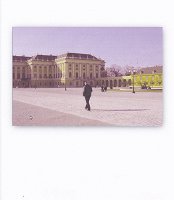
Jedes mal wenn ich ein neues Projekt erstelle, gibt es diese Farbverschiebung, obwohl die Bilder im Storyboard normale Farben haben. Das Programm ist Viedeo Deluxe Premium-Version: 21.0.1.85

Neuer PC i9 der auch für Windows 11 ausreicht. Graphikkarte Nvidia GTX 2070

Anbei ein Foto mit dem Farbfehler.

roekla,

Magix Video deluxe Premium 2026 Ultra + Photostory 2025 + Pro X16

Nikon D5600, Nikon D7100, Panasonic TZ 81 + TZ 202, HC-V777, HC-V250, GoPro 7 Hero Black,

Samsung Galaxy S23 Ultra, Osmo Pocket 2,

CLS PC, Intel Core i9-10850K CPU 3,60 GHz, 32 GB, NVIDIA RTX 2060, 2x SSD 1T, Windows 11 Pro,

Kommentare

Katschmarek schrieb am 15.09.2021 um 16:49 Uhr

Links oben sind 3 Striche. Anklicken, und Standard (2D) wählen.

VideoDeluxe2022 Premium, VDL 2016 Premium

Asus PC Intel I7-10700, RAM 16GB, Grafik: Intel UHD Graphics 630, Gigabyte Nvidia RTX3060 12GB.

Windows10 Pro. (Windows11 Pro).

MB: ASUS PRIME H570M-PLUS

Netzteil Gigabyte 750 Watt

M2 SSD 1 TB

SSD 512 GB

2X HDD 2 TB


roekla schrieb am 16.09.2021 um 07:47 Uhr

Danke für die schnelle Hilfe.

roekla,

Magix Video deluxe Premium 2026 Ultra + Photostory 2025 + Pro X16

Nikon D5600, Nikon D7100, Panasonic TZ 81 + TZ 202, HC-V777, HC-V250, GoPro 7 Hero Black,

Samsung Galaxy S23 Ultra, Osmo Pocket 2,

CLS PC, Intel Core i9-10850K CPU 3,60 GHz, 32 GB, NVIDIA RTX 2060, 2x SSD 1T, Windows 11 Pro,