Video Deluxe 2026 - Access Violation Code - Program Crashes

SHANE-KOHUT wrote on 1/12/2026, 1:27 AM

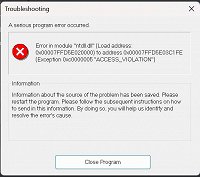
Hi everyone. I have just purchased Video Deluxe 2026 and when trying to start a project I open a drive on my PC where my videos are and I get this Access Violation message pop up and once closed the program crashes. I run Windows 11 and my GPU is an Nvidia 3080ti. PC specs are 64 Bit - Processor - AMD Ryzen 7 9800X3D 8 Core Processor with 64GB Ram.

I have uploaded the latest drivers etc, uninstalled, reinstalled. Why cant something just work for once???

Can anyone assist at all?

Comments

emmrecs wrote on 1/12/2026, 3:42 AM

@SHANE-KOHUT

Welcome to the Magix user to user forums.

Your screenshot shows that the error is being caused by a problem with "ntdll.dll" which is a Windows core file, so not a problem with VdL directly.

You need to have your Windows installation checked. This page from Microsoft is a suggested place to start!

By the way, uninstalling and then reinstalling of a Magix product is not recommended unless you take care to ensure everything associated with the previous installation is removed. (Some files and registry entries are created when the application is first and subsequently run and the default uninstaller does not know of their existence!)

HTH

Jeff
Forum Moderator

Win 11 Pro 64 bit, Intel i7 14700, 32 GB RAM, NVidia RTX 4060 and Intel UHD770 Graphics, Audient EVO 16 audio interface, VPX, MEP, Music Maker, Vegas Pro, PhotoStory Deluxe, Xara 3D Maker 7, Samplitude Pro X7 Suite, Reaper, Adobe Audition CC, 2 x Canon HG10 cameras, 1 x Canon EOS 600D, Akaso EK7000 Pro Action Cam

johnebaker wrote on 1/12/2026, 4:49 AM

@SHANE-KOHUT

Hi

In add ition to @emmrecs comment "ntdll.dll" issues can be caused by drivers for, among other hardware items, the GPU.

. . . . Nvidia 3080ti. . . . I have uploaded the latest drivers . . . .

There is an issue with the latest 591.xxx  NVidia drivers, while this may not fix the issue you are having, you need to revert back to the latest 581.xxx driver - see this support article.

John EB
Forum Moderator

Last changed by johnebaker on 1/12/2026, 4:49 AM, changed a total of 1 times.

VPX 16, Movie Studio 2025, and earlier versions 2015 and 2016, Music Maker Premium 2024.

PC - running Windows 11 23H2 Professional on Intel i7-8700K 3.2 GHz, 16GB RAM, RTX 2060 6GB 192-bit GDDR6, 1 x 1Tb Sabrent NVME SSD (OS and programs), 2 x 4TB (Data) internal HDD + 1TB internal SSD (Work disc), + 6 ext backup HDDs.

Laptop - Lenovo Legion 5i Phantom - running Windows 11 24H2 on Intel Core i7-10750H, 16GB DDR4-SDRAM, 512GB SSD, 43.9 cm screen Full HD 1920 x 1080, Intel UHD 630 iGPU and NVIDIA GeForce RTX 2060 (6GB GDDR6)

Sony FDR-AX53e Video camera, DJI Osmo Action 3 and Sony HDR-AS30V Sports cams.

SHANE-KOHUT wrote on 1/12/2026, 5:31 AM

@SHANE-KOHUT

Welcome to the Magix user to user forums.

Your screenshot shows that the error is being caused by a problem with "ntdll.dll" which is a Windows core file, so not a problem with VdL directly.

You need to have your Windows installation checked. This page from Microsoft is a suggested place to start!

By the way, uninstalling and then reinstalling of a Magix product is not recommended unless you take care to ensure everything associated with the previous installation is removed. (Some files and registry entries are created when the application is first and subsequently run and the default uninstaller does not know of their existence!)

HTH

Jeff
Forum Moderator

Hi Jeff

Thanks for the assistance. None of the above has helped unfortunately. Is there anything else you can think of?

SHANE-KOHUT wrote on 1/12/2026, 5:37 AM

@SHANE-KOHUT

Hi

In add ition to @emmrecs comment "ntdll.dll" issues can be caused by drivers for, among other hardware items, the GPU.

. . . . Nvidia 3080ti. . . . I have uploaded the latest drivers . . . .

There is an issue with the latest 591.xxx  NVidia drivers, while this may not fix the issue you are having, you need to revert back to the latest 581.xxx driver - see this support article.

John EB
Forum Moderator

Hi John

I went back to an older driver but I am still getting the same error. I have a pretty high end cpu along with a decent amount of Ram with a good GPU. What could be the problem?? Why is editing software so glitchy? I dont want to have to try and get a refund as I have had Magix products for a long time. Movie Studio 17 was my last software I had but that wont even load anymore.

SHANE-KOHUT wrote on 1/12/2026, 6:00 AM

@SHANE-KOHUT

Welcome to the Magix user to user forums.

Your screenshot shows that the error is being caused by a problem with "ntdll.dll" which is a Windows core file, so not a problem with VdL directly.

You need to have your Windows installation checked. This page from Microsoft is a suggested place to start!

By the way, uninstalling and then reinstalling of a Magix product is not recommended unless you take care to ensure everything associated with the previous installation is removed. (Some files and registry entries are created when the application is first and subsequently run and the default uninstaller does not know of their existence!)

HTH

Jeff
Forum Moderator

HI Jeff

See below the error log. Maybe this may assist? Apologies but I cannot make hide nor hair of this.


----------------------------------------------------------------------

----------------------------------------------------------------------
MAGIX Video deluxe 2026 Premium  12.01.2026  22:55
----------------------------------------------------------------------
CrashDump 20260112_225550_v25.0.1.248.dmp successfully written

Error in module "ntdll.dll" (Load address: 0x00007FF9C9040000) to address 0x00007FF9C905C1FE (Exception 0xc0000005 "ACCESS_VIOLATION")

Unknown Thread   (ThreadID: 000042dc)
  00007ff9c905c1f6   85 c9 0f 84 d1 0a 00 00 
  00007ff9c905c1fe > 81 7f 10 ee dd ee dd 0f 
  00007ff9c905c206   85 82 0a 00 00 f6 05 b6 

Main Thread
  fffffffffffffff8   ?? ?? ?? ?? ?? ?? ?? ?? 
  0000000000000000 > ?? ?? ?? ?? ?? ?? ?? ?? 
  0000000000000008   ?? ?? ?? ?? ?? ?? ?? ?? 

videodeluxe.exe    10.06.2025  16:57      1239304a

Memory Allocation
Base:        952
PE:        176
Pages:        65.536

PI:        4.512
PI_TEMP_DATA:    9.944
SI:        143.360
SI_TEMP_DATA:    43.752
FSI:        0

Blocks:        0
Temporary:    0
BE:        0
PLE:        0
BE Pool:        48
PLE Pool:        0
wHdr/inst:    0
Image Cache:    0
Video:        13.219.674(0/0)
Bitmap:        0

Thumbnail Cache:    0
SI Display Cache:    10.686.240
PLE Display Cache:    0

Buffer:        0
Pointer:        0

Title:        0
Memory GF:        0
Memory GF Zero:        0
Memory GF Zero_Dyn:        0
Memory GF Dyn:        0
Memory TT:        0
Audio Effect:        0
PPE:        0

Video Monitor:    0
malloc/free:    0
DIB:        0

VP: admin:        0
VP+Trans: privateData:        0
Transitions::        0

Frame Cache:    0
EXIF:        0
VSW:        0
DVDMAKER:    0
global UI (malloc):    0
global UI (valloc):    50.331.648
NOWAGGLE:    0
ReaderFrame:    0
MP3 Reader:    0
JPEG buffer:    0

Private Bytes:    2146 MByte

TLS:        940
MXGUI:        42.006.812
Sum:        116.601.742

Processor [46]  4697MHz  16 Core(s)
Microsoft Windows NT 10.0 (Build 26200)
Used Memory: 1855 MB             Max Used Memory: 1857 MB
Free Virtual Memory: 51591 MB     Total Virtual Memory: 131072 GB

 Call stack:
Address   Frame
00007FF9C905C1FE  000000000085E020  RtlAllocateHeap+2E
00007FF99A2EEC54  000000000085E050  vcomp_atomic_div_r8+6724
00007FF99A2E9E17  000000000085E080  vcomp_atomic_div_r8+18E7
00007FF99A2E9052  000000000085E0C0  vcomp_atomic_div_r8+B22
00007FF99A2E16E1  000000000085E1A0  vcomp_fork+1B1
00007FF999956295  000000000085E280  0001:00015295 C:\Program Files\MAGIX\Video deluxe 2026 Premium\smpwrapper_avx_x64.dll
00007FF999953220  000000000085E630  0001:00012220 C:\Program Files\MAGIX\Video deluxe 2026 Premium\smpwrapper_avx_x64.dll
00007FF95349A302  000000000085E638  0001:00009302 C:\Program Files\MAGIX\Video deluxe 2026 Premium\ImageProcessingPlugins\MxVfxClrConv_x64.dll
00000000000003C0  000000000085E640  0000:00000000 C:\Program Files\MAGIX\Video deluxe 2026 Premium\videodeluxe.exe
000000000085E870  000000000085E648  0000:00000000 
00000000000FD200  000000000085E650  0000:00000000 
3FBE838C91126421  000000000085E658  0000:00000000 
3FEE6AC20000021C  000000000085E660  0000:00000000 
000000008E1F1080  000000000085E668  0000:00000000 
0000000000000780  000000000085E670  0000:00000000 C:\Program Files\MAGIX\Video deluxe 2026 Premium\videodeluxe.exe
00000000000FD200  000000000085E678  0000:00000000 
0000021C000003C0  000000000085E680  0000:00000000 C:\Program Files\MAGIX\Video deluxe 2026 Premium\videodeluxe.exe
000000000085E870  000000000085E688  0000:00000000 
001000003231564E  000000000085E690  0000:00000000 
719B3800AA000080  000000000085E698  0000:00000000 
000000007C2EE038  000000000085E6A0  0000:00000000 
00007FF95349DC84  000000000085E6A8  0001:0000CC84 C:\Program Files\MAGIX\Video deluxe 2026 Premium\ImageProcessingPlugins\MxVfxClrConv_x64.dll
000000007C2EE060  000000000085E6B0  0000:00000000 
0000000000000001  000000000085E6B8  0000:00000000 C:\Program Files\MAGIX\Video deluxe 2026 Premium\videodeluxe.exe
 

vdl-user-v19 wrote on 1/12/2026, 6:23 AM

@SHANE-KOHUT,

https://learn.microsoft.com/en-us/cpp/windows/latest-supported-vc-redist?view=msvc-170#latest-supported-redistributable-version

(X86 & X64)

Have you tried installing the latest v14 of Visual C++ Redistributable? That might fix the problem. 

SHANE-KOHUT wrote on 1/12/2026, 7:09 AM

@SHANE-KOHUT,

https://learn.microsoft.com/en-us/cpp/windows/latest-supported-vc-redist?view=msvc-170#latest-supported-redistributable-version

(X86 & X64)

Have you tried installing the latest v14 of Visual C++ Redistributable? That might fix the problem. 

You sir are a genius. Problem solved. Thankyou very much.

SHANE-KOHUT wrote on 1/12/2026, 7:10 AM

@SHANE-KOHUT

Hi

In add ition to @emmrecs comment "ntdll.dll" issues can be caused by drivers for, among other hardware items, the GPU.

. . . . Nvidia 3080ti. . . . I have uploaded the latest drivers . . . .

There is an issue with the latest 591.xxx  NVidia drivers, while this may not fix the issue you are having, you need to revert back to the latest 581.xxx driver - see this support article.

John EB
Forum Moderator

Hi John, problem solved. I installed the latest v14 of Visual C++ Redistributable

SHANE-KOHUT wrote on 1/12/2026, 7:11 AM

@SHANE-KOHUT

Welcome to the Magix user to user forums.

Your screenshot shows that the error is being caused by a problem with "ntdll.dll" which is a Windows core file, so not a problem with VdL directly.

You need to have your Windows installation checked. This page from Microsoft is a suggested place to start!

By the way, uninstalling and then reinstalling of a Magix product is not recommended unless you take care to ensure everything associated with the previous installation is removed. (Some files and registry entries are created when the application is first and subsequently run and the default uninstaller does not know of their existence!)

HTH

Jeff
Forum Moderator

Problem solved Jeff. I installed the latest v14 of Visual C++ Redistributable and we are good to go. Thanks for your help