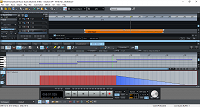
MIDI fade velocity / volume

gpcode2014 wrote on 3/6/2026, 9:42 AM

Hi- I've drawn a fade in the MIDI editor, but the volume (in blue) does not change in the mix..what might I be missing? It is with Vita Orchestral Strings in Magix Samplitude Music Studio build 36 / 64 bit

Win10
Processor    Intel(R) Core(TM) i5-3470 CPU @ 3.20GHz   3.20 GHz
Installed RAM    8.00 GB (7.87 GB usable)
Storage    224 GB SSD PNY
Graphics Card    Intel(R) HD Graphics (32 MB)
64-bit operating system

 

Comments

SP. wrote on 3/6/2026, 11:22 AM

@gpcode2014 There are a lot of ways to do it. You first need to map MIDI CC 7 to the volume control inside the Vita Instruments. Make a right click on the volume control knob and select curve 7.

If you don't want to use MIDI but want the DAW to automate the volume you can also create an automation curve for the volume control by holding CTRL and ALT and then clicking the volume control, but be aware, I currently don't know if this will work in your old version of Samplitude Music Studio. You can then draw a curve with your mouse.

Alternatively, if you hold CTRL and ALT during payback and turn knobs and move faders, the changes will be written to the automation curve in real-time.

You can also draw a volume automation curve on the track itself or on individual audio objects (via the object editor).