Greetings,
I've been asked to try and clean a video on a CD given to me by my brother. It's of his friend Ron who made a living recreating the ancient Worcestershire woodland practices.
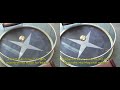
AVI (MJPEG) - progressive - 320x240 - Note the horizontal 1 pixel high lines at regular intervals The first and last scene clearly show the problem; the middle scene shows how it's acceptable for most of the video (this clip is a direct copy, cut using Avidemux)
I know that the forum re-encodes uploaded video but I really don't think that will affect what you see.
edit --- when I looked at the post it seems that the AVI would play for me. I assume the forum doesn't like MJPEG AVIs? IHere's an MP4 version in case the AVI doesn't play. The problem is still shown
Nothing out of the ordinary there I don't think, apart from being a distressingly small resolution but that can be overcome with an understandably low but acceptable degree of quality.
The video was commissioned by a publisher to accompany a book written by my brother and his friend Ron and this CD was given to them, with footage roughly edited to 10 minutes, to write a commentary for it; as it was a demo, that explains the low resolution and quality. The book was published but not with the video. Sadly the original video is long gone, as is the publisher and indeed, Ron.
Cleaning and tidying the video is comparatively easy using the arsenal of effects I have but the horizontal lines are persistent and are really starting to annoy me. I can only assume that it's something to do with de-interlacing, or rather not de-interlacing, when creating the original progressive demo files.
I've seen "jaggly" lines on video that have that de-interlacing problem but this is different to anything I've come across. As the clip above (hopefully) shows, for most of the video it's not noticeable but for a few scenes it's horrendous, usually where horizontal branches or leaf fall carpet is shown - well it is for me; my wife says it's OK when she's seen a cleaned up / de-noised test encode.
I've tried re-interlacing, dropping frames, doubling up frames, font smoothing, drinking gallons of tea but all with no real difference.
Any ideas as to what the lines are? Any ideas as to what can be done? Or should I just reluctantly accept that "it is what it is"?
AndyW