Exporting video to HEVC does not use the GPU

Jan-Stribny wrote on 8/19/2026, 8:24 AM

 Hi. 
In the settings, I've specified that the GPU should be used for exporting NVIDIA Geforce
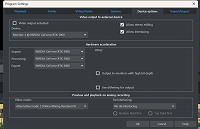
Then, when I want to export a video to HEVC, I also set it to use hardware acceleration: multiple GPUs
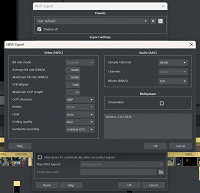
But then, when I start rendering and look at the Task Manager, I see that the GPU isn’t being used at all, and the rendering takes an incredibly long time.  Basically, the CPU load just shoots up to almost 100%.
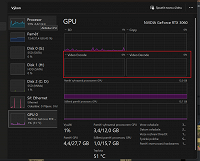
The video I’m exporting is 21 minutes long, and the estimated rendering time is 24 hours.
CPU: AMD Ryzen 7 5700G
GPU: NVIDIA GeForce RTX 3060
RAM: 32 GB DDR4
HDD: NVMe M.2

Can you please advise me on why the GPU isn’t being used for video rendering?

 

Comments

johnebaker wrote on 8/19/2026, 11:48 AM

@Jan-Stribny

Hi

Looking at your images, it would appear that the HEVC export settings have been modified, is this correct if so is there a reason for doing this?

Personally I do not recommend changing the preset export values, they are set for optimum file size versus perceived quality and, IMHO, should not be changed unless you have to meet a specific requirement eg for uploading to a web site or to meet a clients request.

Do note that video audio sample rate is mainly 48kHz, 192 kBitps, 44.1 kHz is the CD and some streaming audio file formats 'normal' sample rate.

Situations where the GPU will not be used are:

  • The source material is mainly images, these are not hardware accelerated on import.
  • Some applied effects may not be hardware accelerated on export
  • Export to an unsupported bit depth
  • Exporting to a non-standard resolution which is not supported by the GPU NVENC or AMD integrated GPU modules.

For a more specific answer, we need more information:

  • Are the RTX and AMD GPU drivers up to date?
     
  • A screen shot of the Preset used - the Advanced options are hiding this.
     
  • The source media mix, ie images/video, and formats.
     
  • What effects have been applied to the media?
     
  • What is the audience/use of the finished export, eg uploading to a web site, YouTube, presentation (projection) etc?

John EB
Forum Moderator

Last changed by johnebaker on 8/19/2026, 11:50 AM, changed a total of 1 times.

VPX 17, Video deluxe 2026, and earlier versions MEP 2015 and 2016, Music Maker Premium 2026.

PC - running Windows 11 25H2 Professional on Intel i7-8700K 3.2 GHz, 16GB RAM, RTX 2060 6GB 192-bit GDDR6, 1 x 1Tb Sabrent NVME SSD (OS and programs), 2 x 4TB (Data) internal HDD + 1TB internal SSD (Work disc), + ext backup HDDs.

Laptop - Lenovo Legion 5i Phantom - running Windows 11 25H2 on Intel Core i7-10750H, 16GB DDR4-SDRAM, 512GB SSD, 43.9 cm screen Full HD 1920 x 1080, Intel UHD 630 iGPU and NVIDIA GeForce RTX 2060 (6GB GDDR6)

Sony FDR-AX53e Video camera, DJI Osmo Action 3 and Sony HDR-AS30V Sports cams.