Photostory 2026, "RC String 8875 not found"

David-Robinson5527 wrote on 2/5/2026, 4:02 AM

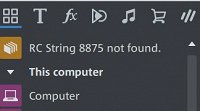
Since upgrading from the 2025 version the message "RC String 8875 not found" appears at the top of the Explorer Column. . The program appears to be working OK but this message is still very puzzling. I have tried to get help from Tech Support but the BOT gods are not playing ball. Reinstallation of the program and clearing all older version data from C drive programs have not helped.
Comments

emmrecs wrote on 2/5/2026, 4:38 AM

@David-Robinson5527

As far as I can remember this is the first occasion on which this specific error message has ever been seen.

A quick Google search on it returns the only result as this thread (!) so no help there either. I've just checked my installation of PS 2026 and don't see it so that's no help to you either!

Since the program appears to be working OK I think you can safely ignore it but I wonder whether it is a problem being created by something in Windows itself? Which version of the OS do you run? Mine is Windows 11 25H2. Have you run any of the standard checks on your windows installation? (If you're not sure how to do this a quick Google search on "Windows Installation Checks" will give you a number of starting points, though the advice is always to proceed carefully. However, the basic check of sfc /scannow is one that can be safely run, in my experience.)

HTH

Jeff
Forum Moderator

Win 11 Pro 64 bit, Intel i7 14700, 32 GB RAM, NVidia RTX 4060 and Intel UHD770 Graphics, Audient EVO 16 audio interface, VPX, MEP, Music Maker, Vegas Pro, PhotoStory Deluxe, Xara 3D Maker 7, Samplitude Pro X7 Suite, Reaper, Adobe Audition CC, 2 x Canon HG10 cameras, 1 x Canon EOS 600D, Akaso EK7000 Pro Action Cam

David-Robinson5527 wrote on 2/5/2026, 5:11 AM

@David-Robinson5527

As far as I can remember this is the first occasion on which this specific error message has ever been seen.

A quick Google search on it returns the only result as this thread (!) so no help there either. I've just checked my installation of PS 2026 and don't see it so that's no help to you either!

Since the program appears to be working OK I think you can safely ignore it but I wonder whether it is a problem being created by something in Windows itself? Which version of the OS do you run? Mine is Windows 11 25H2. Have you run any of the standard checks on your windows installation? (If you're not sure how to do this a quick Google search on "Windows Installation Checks" will give you a number of starting points, though the advice is always to proceed carefully. However, the basic check of sfc /scannow is one that can be safely run, in my experience.)

HTH

Jeff
Forum Moderator

Hi Jeff My PC is running Windows 11 Home 25H2. I have run sfc/scannow and no problems were found. I don't believe it is a Windows problem as this issue only appeared the moment I installed and launched Photostory 2026. Certainly might be a conflict with Windows and Photostory but it seems strange no one else has noticed/reported it so far. Although many folks might not notice it especially as it can disappear for a while whilst using the program.

johnebaker wrote on 2/5/2026, 5:32 AM

@David-Robinson5527, @emmrecs

Hi

From your image it looks like you have this option missing, this may be due to an issue with one of the language translation files.

Try resetting the program back to its default settings, File, Settings, Default values, Reset program settings to default.

Do note this will reset any changes you made to the programs settings and folder paths.

HTH

John EB
Forum Moderator

VPX 16, Movie Studio 2025, and earlier versions 2015 and 2016, Music Maker Premium 2024.

PC - running Windows 11 23H2 Professional on Intel i7-8700K 3.2 GHz, 16GB RAM, RTX 2060 6GB 192-bit GDDR6, 1 x 1Tb Sabrent NVME SSD (OS and programs), 2 x 4TB (Data) internal HDD + 1TB internal SSD (Work disc), + 6 ext backup HDDs.

Laptop - Lenovo Legion 5i Phantom - running Windows 11 24H2 on Intel Core i7-10750H, 16GB DDR4-SDRAM, 512GB SSD, 43.9 cm screen Full HD 1920 x 1080, Intel UHD 630 iGPU and NVIDIA GeForce RTX 2060 (6GB GDDR6)

Sony FDR-AX53e Video camera, DJI Osmo Action 3 and Sony HDR-AS30V Sports cams.

David-Robinson5527 wrote on 2/5/2026, 5:45 AM

@David-Robinson5527, @emmrecs

Hi

From your image it looks like you have this option missing, this may be due to an issue with one of the language translation files.

Try resetting the program back to its default settings, File, Settings, Default values, Reset program settings to default.

Do note this will reset any changes you made to the programs settings and folder paths.

HTH

John EB
Forum Moderator

Hi John I reset to defaults a day or so ago and it didn't make any difference at all. However I may have a clue to the problem. I will post an update to what I have found ASAP

David-Robinson5527 wrote on 2/5/2026, 5:53 AM

UPDATE I notice the message "RC String 8875 not found" only appears when in the Classic view. If the message is showing left clicking on the message takes the view from Classic View to List View and the message disappears. The message is only seen in Classic View which unfortunately is the one I like best. It is obviously a glitch in Photostory and doesn't seem to affect the use of the program so I will live with it. Maybe the BOT gods will come up with a fix one day.
