Sound Forge Pro 18 - can't change bit depth to 32

David-Rees wrote on 11/29/2025, 6:32 PM

I am using the latest Sound Forge 18 Pro on (18.0.0 build 21) Windows 11

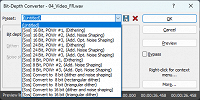
Whenever I take a wav file and try to set the bit depth to 32 (or 32 float) with the Pow-R dialog, the file gets messed up (all audio jumps to 100% volume).  If I look in the "Presets" pulldown of the same dialog box, I see every preset there EXCEPT for the 32 bit options. Screen capture attached. Note the "Preset" pulldown contains options 8, 16 and 24 bit - but no "32 bit" options.

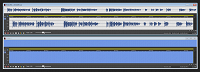
In the second screen capture you can see the result I get (at the bottom) if I take any WAV file and try to set the bit-depth to 32 bits by using the "Bit Depth" pulldown (instead of the "presets" pulldown)
I am thinking my installation is missing the bit-depth 32 presets.
 

Comments

johnebaker wrote on 11/30/2025, 1:57 AM

@David-Rees

Hi

Do you not have the options shown below?

Once set, the bit depth, you can save this as a preset, is available when the Bit Depth converter in the Export dialog is checked.

John EB
Forum Moderator

Last changed by johnebaker on 11/30/2025, 1:58 AM, changed a total of 1 times.

VPX 16, Movie Studio 2025, and earlier versions 2015 and 2016, Music Maker Premium 2024.

PC - running Windows 11 23H2 Professional on Intel i7-8700K 3.2 GHz, 16GB RAM, RTX 2060 6GB 192-bit GDDR6, 1 x 1Tb Sabrent NVME SSD (OS and programs), 2 x 4TB (Data) internal HDD + 1TB internal SSD (Work disc), + 6 ext backup HDDs.

Laptop - Lenovo Legion 5i Phantom - running Windows 11 24H2 on Intel Core i7-10750H, 16GB DDR4-SDRAM, 512GB SSD, 43.9 cm screen Full HD 1920 x 1080, Intel UHD 630 iGPU and NVIDIA GeForce RTX 2060 (6GB GDDR6)

Sony FDR-AX53e Video camera, DJI Osmo Action 3 and Sony HDR-AS30V Sports cams.

David-Rees wrote on 11/30/2025, 10:03 AM

Yes I do. When I select either of the 32 bit options in that pulldown, the volume of my wav file goes to 100% (see lower screen capture above containing large block of blue).

rraud wrote on 11/30/2025, 12:36 PM

I cannot duplicate the behavior. I used the bit rate converter to convert a stereo 44.1k/16 bit file to FP-32 bit and 'Save as' to create a new file, No issues with the new file.
Maybe try resetting SF (in the 'File' menu).

David-Rees wrote on 11/30/2025, 2:32 PM

Thanks. I reset my preferences and the 32 bit option works now. I appreciate the help.

David-Rees wrote on 12/17/2025, 11:04 AM

I did a reset and it solved the problem for a while, but 2 weeks later the problem started happening again.

SP. wrote on 12/17/2025, 11:43 AM

@David-Rees Which audio driver is selected in the program preferences? Usually, Microsoft Sound Mapper should work fine, in case this is caused by the audio driver.

David-Rees wrote on 12/17/2025, 11:49 AM

Microsoft Sound Mapper. I contacted Magix support a month ago using their support ticket form. I received an email saying some error occurred with the form and they asked me to resend all my information in an email (which I did). I haven't heard from them since.

SP. wrote on 12/19/2025, 5:09 PM

@David-Rees Does this problem happen with any WAV file? For example, if you create a new file and fill it with the noise generator, does changing the bit depth also cause the volume to deteriorate? If other files aren't effected, maybe it has something to do with the files you're trying to edit. Are these standard PCM WAV files?

David-Rees wrote on 12/19/2025, 5:38 PM

Yes, it does happen on a new file I create - but this helped illuminate something: It only happens when I am lowering the bit depth to 32.

Steps:

1) Create new 44-16 stereo file

2) Change bit depth to 64

3) Change bit depth to 32

Problem happens


David-Rees wrote on 12/22/2025, 11:50 AM

Can anyone else duplicate this when going from 64 to 32bit?

johnebaker wrote on 12/22/2025, 12:43 PM

@David-Rees

Hi

I can replicate this using the steps you have given, however it does beg the question why are you doing this?

Increasing the bit depth from 16 to 24, 32 or 64 bit does not gain anything in dynamic range or compensate for editing losses.

The reverse is actually used in professional recording, and editing, ie starting with the higher bit depth eg 32 or 64 for recording and then, for final product, convert down to the required bit depth where required.

However the actual bit depth you can record at depends on the audio device Microsoft Sound Mapper is using, this is normally the Windows default recording/playback device which, by default, is the Windows Stereo Mixer which does not support 32 or 64 bit for recording.

John EB

Last changed by johnebaker on 12/22/2025, 12:50 PM, changed a total of 1 times.

VPX 16, Movie Studio 2025, and earlier versions 2015 and 2016, Music Maker Premium 2024.

PC - running Windows 11 23H2 Professional on Intel i7-8700K 3.2 GHz, 16GB RAM, RTX 2060 6GB 192-bit GDDR6, 1 x 1Tb Sabrent NVME SSD (OS and programs), 2 x 4TB (Data) internal HDD + 1TB internal SSD (Work disc), + 6 ext backup HDDs.

Laptop - Lenovo Legion 5i Phantom - running Windows 11 24H2 on Intel Core i7-10750H, 16GB DDR4-SDRAM, 512GB SSD, 43.9 cm screen Full HD 1920 x 1080, Intel UHD 630 iGPU and NVIDIA GeForce RTX 2060 (6GB GDDR6)

Sony FDR-AX53e Video camera, DJI Osmo Action 3 and Sony HDR-AS30V Sports cams.

David-Rees wrote on 12/22/2025, 1:02 PM

Thanks John. This client had me doing a bunch of work that involved pitch and time stretching audio that they recorded on their end. My general procedure before I use algorithms to manipulate audio like this is to upscale the audio, perform the functions I need to perform (on higher sample rate and bit-depth audio) and then downscale the final result to the spec they want for delivery.

SP. wrote on 12/23/2025, 2:56 AM

@David-Rees This has to be a bug? I tried your steps and this problem also happens in Sound Forge 12, so it's a problem happening for many years. But, it seems like saving the file via Save As... and then selecting 32 Bit Float as the output bit depth works without any problems. But then you don't have any fine control on how the file gets dithered.
