Sound Forge Pro 18 - can't change bit depth to 32

David-Rees wrote on 11/29/2025, 6:32 PM

I am using the latest Sound Forge 18 Pro on (18.0.0 build 21) Windows 11

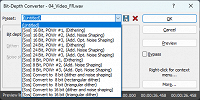
Whenever I take a wav file and try to set the bit depth to 32 (or 32 float) with the Pow-R dialog, the file gets messed up (all audio jumps to 100% volume).  If I look in the "Presets" pulldown of the same dialog box, I see every preset there EXCEPT for the 32 bit options. Screen capture attached. Note the "Preset" pulldown contains options 8, 16 and 24 bit - but no "32 bit" options.

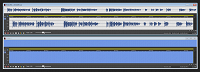
In the second screen capture you can see the result I get (at the bottom) if I take any WAV file and try to set the bit-depth to 32 bits by using the "Bit Depth" pulldown (instead of the "presets" pulldown)
I am thinking my installation is missing the bit-depth 32 presets.
 

Comments

johnebaker wrote on 11/30/2025, 1:57 AM

@David-Rees

Hi

Do you not have the options shown below?

Once set, the bit depth, you can save this as a preset, is available when the Bit Depth converter in the Export dialog is checked.

John EB
Forum Moderator

Last changed by johnebaker on 11/30/2025, 1:58 AM, changed a total of 1 times.

VPX 16, Movie Studio 2025, and earlier versions 2015 and 2016, Music Maker Premium 2024.

PC - running Windows 11 23H2 Professional on Intel i7-8700K 3.2 GHz, 16GB RAM, RTX 2060 6GB 192-bit GDDR6, 1 x 1Tb Sabrent NVME SSD (OS and programs), 2 x 4TB (Data) internal HDD + 1TB internal SSD (Work disc), + 6 ext backup HDDs.

Laptop - Lenovo Legion 5i Phantom - running Windows 11 24H2 on Intel Core i7-10750H, 16GB DDR4-SDRAM, 512GB SSD, 43.9 cm screen Full HD 1920 x 1080, Intel UHD 630 iGPU and NVIDIA GeForce RTX 2060 (6GB GDDR6)

Sony FDR-AX53e Video camera, DJI Osmo Action 3 and Sony HDR-AS30V Sports cams.

David-Rees wrote on 11/30/2025, 10:03 AM

Yes I do. When I select either of the 32 bit options in that pulldown, the volume of my wav file goes to 100% (see lower screen capture above containing large block of blue).

rraud wrote on 11/30/2025, 12:36 PM

I cannot duplicate the behavior. I used the bit rate converter to convert a stereo 44.1k/16 bit file to FP-32 bit and 'Save as' to create a new file, No issues with the new file.
Maybe try resetting SF (in the 'File' menu).

David-Rees wrote on 11/30/2025, 2:32 PM

Thanks. I reset my preferences and the 32 bit option works now. I appreciate the help.
