Stopping pop-ups from MAGIX on PC Boot

Comments

rickduley wrote on 1/5/2025, 4:53 PM

Two weeks down the track and the MAGIX Grinch is leaving me alone. I haven't been visited by a pop-up since my last post. That's all very nice, but to achieve that I had to remove everything MAGIX from my PC except the "Bare Bones" Video Pro X16.

That's satisfactory in that I can still do some work WITH THE PRODUCT I PAID FOR but I am left with a nasty taste in my mouth because there are some functionalities on X16 that I can no longer use. Why am I expected to PAY FOR SOMETHING and then throw most of is away to avoid being pestered with pop-ups?

--------------------------------------------
Rick Duley
North Perth,
Western Australia
--------------------------------------------

My machine is Intel(R) Core(TM) i5-8500 CPU @ 3.00GHz   3.00 GHz; 64-bit operating system, x64-based processor, Nvidia GT 730 GPU
Edition    Windows 11 Pro; Version    22H2
Installed on    ‎3/‎04/‎2024 OS build    22621.3447
Experience    Windows Feature Experience Pack 1000.22688.1000.0

rickduley wrote on 5/28/2026, 7:45 PM

Hi all

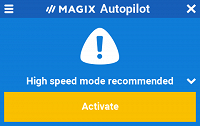
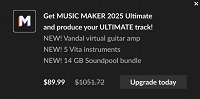
The Grinch is back. For the past couple of days I have been greeted by this (or similar)

This would appear to be a MAGIX ad so I am, again, going to blame MAGIX.

I have (just now) worked through this thread and checked that I have undertaken all the suggested remedies. I have. The Grinch is still back.

Who will rid me of this turbulent [pest]? 👺

--------------------------------------------
Rick Duley
North Perth,
Western Australia
--------------------------------------------

My machine is Intel(R) Core(TM) i5-8500 CPU @ 3.00GHz   3.00 GHz; 64-bit operating system, x64-based processor, Nvidia GT 730 GPU
Edition    Windows 11 Pro; Version    22H2
Installed on    ‎3/‎04/‎2024 OS build    22621.3447
Experience    Windows Feature Experience Pack 1000.22688.1000.0

SP. wrote on 5/29/2026, 2:27 AM

@rickduley It looks like this is loaded inside Video Deluxe or Pro X? There is usually an option inside the program settings to disable this.

rickduley wrote on 5/29/2026, 2:32 AM

You're right @SP. The problem is than none of the settings actually disable this.

--------------------------------------------
Rick Duley
North Perth,
Western Australia
--------------------------------------------

My machine is Intel(R) Core(TM) i5-8500 CPU @ 3.00GHz   3.00 GHz; 64-bit operating system, x64-based processor, Nvidia GT 730 GPU
Edition    Windows 11 Pro; Version    22H2
Installed on    ‎3/‎04/‎2024 OS build    22621.3447
Experience    Windows Feature Experience Pack 1000.22688.1000.0

SP. wrote on 5/29/2026, 2:51 AM

@rickduley Can you upload a screenshot where we can see, that you enabled the option to hide news in the program settings?

johnebaker wrote on 5/29/2026, 4:46 PM

@rickduley

Hi Rick

. . . . The problem is than none of the settings actually disable this . . . .

They won't, from your image that looks like an Ad rather than a 'news' article from within the program.

The ad should have a grey gear icon bottom left of the ad pane where you can choose not to show ads.

Check that Magix Cloud import has not been re-installed.

John EB

Last changed by johnebaker on 5/29/2026, 4:48 PM, changed a total of 1 times.

VPX 17, Video deluxe 2026, and earlier versions MEP 2015 and 2016, Music Maker Premium 2026.

PC - running Windows 11 25H2 Professional on Intel i7-8700K 3.2 GHz, 16GB RAM, RTX 2060 6GB 192-bit GDDR6, 1 x 1Tb Sabrent NVME SSD (OS and programs), 2 x 4TB (Data) internal HDD + 1TB internal SSD (Work disc), + ext backup HDDs.

Laptop - Lenovo Legion 5i Phantom - running Windows 11 25H2 on Intel Core i7-10750H, 16GB DDR4-SDRAM, 512GB SSD, 43.9 cm screen Full HD 1920 x 1080, Intel UHD 630 iGPU and NVIDIA GeForce RTX 2060 (6GB GDDR6)

Sony FDR-AX53e Video camera, DJI Osmo Action 3 and Sony HDR-AS30V Sports cams.

rickduley wrote on 5/29/2026, 8:53 PM

Thanks @johnebaker


No grey bears. But there is some good news ...

@SP. wanted to see the "Hide News" pane

and it is set to hide the news.
The good news is that I have started VPX16 twice this morning and have been free of the curse. I haven't adjusted anything and yesterday I was definitely cursed.


Computers!
Bah!
Humbug!😵

--------------------------------------------
Rick Duley
North Perth,
Western Australia
--------------------------------------------

My machine is Intel(R) Core(TM) i5-8500 CPU @ 3.00GHz   3.00 GHz; 64-bit operating system, x64-based processor, Nvidia GT 730 GPU
Edition    Windows 11 Pro; Version    22H2
Installed on    ‎3/‎04/‎2024 OS build    22621.3447
Experience    Windows Feature Experience Pack 1000.22688.1000.0

maxiben-b wrote on 10/6/2026, 6:58 AM

Спустя две недели MAGIX-«Гринч» оставил меня в покое. С момента моего последнего сообщения всплывающие окна меня не навещали. Это очень хорошо, но для этого мне пришлось удалить с компьютера всё, что связано с MAGIX, кроме "минимально укомплектованной" версии Video Pro X16.

В целом, меня устраивает, что я всё ещё могу работать с продуктом, за который заплатил , но у меня остался неприятный осадок, потому что некоторые функции X16 я больше не могу использовать. Почему я должен ПЛАТИТЬ ЗА ЧТО-ТО , а потом выбрасывать большую часть этого, чтобы избежать надоедливых всплывающих окон?

I agree, the situation is pretty strange. You pay for the full version of the program, but in the end you have to uninstall some of the components just to be able to work in peace without constant pop-ups. The developers should have included a proper setting to completely disable these notifications. Users should be able to decide for themselves which features they need, especially in a paid product.

Translated with DeepL.com (free version)