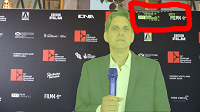
I've just started playing with AI Smart Mask 2.0 in Vegas Pro 21. I managed to mask a 5 second clip, and overall it looks very good. But one frame has a problem. It included a few small areas I didn't want masked, and I'm not sure how to fix it. Looking at the image I uploaded, it's the area outlined in red. I haven't found any tutprials on how to correct a single frame. Any help will be apreciated.