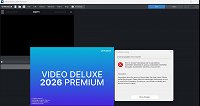
Error Messages when trying to open MAGIX Video deluxe 2026 Prem

stephen-logsdon wrote on 11/11/2025, 9:25 AM

I upgraded to this program the first week of September. after a week, I suddenly started getting this message and cannot use the program anymore, I have uninstalled, re-installed, and get small abort messages when trying to re-install. I would like someone to present some advice or suggestions to getting this resolved please. Otherwise, I have emailed several times to the company only to get an AI -email bot, or someone who said they would get back to me on it and I havent heard anything in 2 months. Can i get some assistance?

Comments

johnebaker wrote on 11/11/2025, 12:11 PM

@stephen-logsdon

Hi

We need more information to help diagnose the issue(s) you are having:

  1. Follow this tutorial to determine if any errors have been logged and post a screenshot of the details.
     
  2. The specification of your computer system including Windows version and program version, see this topic https://www.magix.info/us/forum/please-do-the-following-before-posting-your-question--621831/ for what is required and please quote processor and graphics card make/model in full, and also what monitor/screen resolution(s) you are working with if this is a laptop.

    I would suggest you put this information in your profile signature so we do not have to keep asking for it.
     
  3. What has changed on the computer between working and non-working?

John EB
Forum Moderator

VPX 16, Movie Studio 2025, and earlier versions 2015 and 2016, Music Maker Premium 2024.

PC - running Windows 11 23H2 Professional on Intel i7-8700K 3.2 GHz, 16GB RAM, RTX 2060 6GB 192-bit GDDR6, 1 x 1Tb Sabrent NVME SSD (OS and programs), 2 x 4TB (Data) internal HDD + 1TB internal SSD (Work disc), + 6 ext backup HDDs.

Laptop - Lenovo Legion 5i Phantom - running Windows 11 24H2 on Intel Core i7-10750H, 16GB DDR4-SDRAM, 512GB SSD, 43.9 cm screen Full HD 1920 x 1080, Intel UHD 630 iGPU and NVIDIA GeForce RTX 2060 (6GB GDDR6)

Sony FDR-AX53e Video camera, DJI Osmo Action 3 and Sony HDR-AS30V Sports cams.

stephen-logsdon wrote on 11/11/2025, 6:00 PM


Microsoft Windows 11 Home (64-bit) 25H2 (10.0.26200)

Processor                      Intel® Core™ i9-13900H

Graphics                         Intel® Iris® Xe Graphics

Audio                              Realtek High Definition Audio

AVG Secure VPN Wintun Adapter

Memory                          16 GB

Storage                           WD My Passport 0827 USB Device

WD My Passport 260D USB Device


MAGIX Video deluxe 2026 Premium (en-US) 1.3.63.55

I updated all intel drivers and graphic cards online. I uninstalled MAGIX 2026 premier, then re-installed it and tried it again.. same results. here are the the results, including my attempt when i initially tried to open

here are the results of the programs when i looked over since 11-2-2025. it would not let me see what happened in september. any help would be greatly appreciated. As i said, It was working fine the first week when i downloaded and used it.. then it suddenly shut off after I finished saving a video. I did nothing out of the normal.

stephen-logsdon wrote on 11/12/2025, 8:35 PM

thanks for the edit. Any help would be appreciated

johnebaker wrote on 11/13/2025, 3:17 AM

@stephen-logsdon

Hi

Thanks for the Reliability Monitor screen shots.

Several screen shots, images 1,3,4,7 counting L to R suggest that you are running Webroot SecureAnywhere as your Antivirus progam and it is crashing.

I would advise you to uninstall this software, and allow the computer to revert to Microsoft Defender, using Revo Uninstaller Portable edition, this is a self contained version of Revo that can be run from a memory stick, there is no install as such, all required files are dropped in to a folder you create for it and can be run from there, instuctions are in the User Guide PDF that is put in the folder.

When you get to the scan for left overs step use the Moderate scan setting.

After uninstall do a full Restart of the computer and allow Defender to complete updates if necessary, then try VDL.

John EB

VPX 16, Movie Studio 2025, and earlier versions 2015 and 2016, Music Maker Premium 2024.

PC - running Windows 11 23H2 Professional on Intel i7-8700K 3.2 GHz, 16GB RAM, RTX 2060 6GB 192-bit GDDR6, 1 x 1Tb Sabrent NVME SSD (OS and programs), 2 x 4TB (Data) internal HDD + 1TB internal SSD (Work disc), + 6 ext backup HDDs.

Laptop - Lenovo Legion 5i Phantom - running Windows 11 24H2 on Intel Core i7-10750H, 16GB DDR4-SDRAM, 512GB SSD, 43.9 cm screen Full HD 1920 x 1080, Intel UHD 630 iGPU and NVIDIA GeForce RTX 2060 (6GB GDDR6)

Sony FDR-AX53e Video camera, DJI Osmo Action 3 and Sony HDR-AS30V Sports cams.

stephen-logsdon wrote on 11/15/2025, 8:43 AM

OK, I believe I have completed what you stated. i installed Revo. I deleted webroot software, the MAGIX deluxe and all associated with it. Restarted the laptop, re-installed MAGIX, this time it did not want to abort when trying to upload. (MAGIX Installation Manager) and uploaded fine. After that was completed. I decided to restart again and started the MAGIX program again.. same result. (videodeluxe.exe) error. started the MAGIX program again.. same result. (videodeluxe.exe) error. Here are the screenshots for today. Any other suggestions? This is getting frustrating.

emmrecs wrote on 11/15/2025, 9:37 AM

@stephen-logsdon

Thanks for the additional Reliability Monitor screenshots.

BUT these show no evidence of any app failure (there's a complete absence of any red Xs for the past four days!)

I notice the second image does suggest that VdL has been "successfully reconfigured", an entry which is normal, IMO. (I see that in the Reliability Monitor on my computer).

Given the above, I think we need to look at the Windows installation on your computer. Please go to Settings (easiest method is to right-click on the Windows Start logo, bottom left hand corner of your screen), open either Command Prompt (as Admin) or Terminal (as Admin) (whichever option is offered) and, at the cursor type sfc /scannow (with a space between "..c" and "/").

Allow the process to complete, it will tell you what, if any errors it has found and repaired. It could be useful if you were to screenshot any error message and post it here, but before you reply further to this thread, restart your computer again and retry to run VdL.

Jeff
Forum Moderator

Last changed by emmrecs on 11/15/2025, 9:38 AM, changed a total of 1 times.

Win 11 Pro 64 bit, Intel i7 14700, 32 GB RAM, NVidia RTX 4060 and Intel UHD770 Graphics, Audient EVO 16 audio interface, VPX, MEP, Music Maker, Vegas Pro, PhotoStory Deluxe, Xara 3D Maker 7, Samplitude Pro X7 Suite, Reaper, Adobe Audition CC, 2 x Canon HG10 cameras, 1 x Canon EOS 600D, Akaso EK7000 Pro Action Cam

stephen-logsdon wrote on 11/15/2025, 10:15 AM

I followed your instructions. here is the result.

SP. wrote on 11/15/2025, 12:42 PM

@stephen-logsdon Have you tried to reset the program settings by renaming or deleting the videodeluxe.ini file? It should be located under C:\Users\*YourWindowsUsername*\AppData\Roaming\MAGIX\ and then inside the folder of your current version of Video Deluxe.

stephen-logsdon wrote on 11/15/2025, 2:05 PM

I do not see this. I have an app to open to the file and a shortcut. I could not locate this once i got to my user name. Any assistance on how to open that app would be greatly appreciated.

SP. wrote on 11/15/2025, 3:51 PM

@stephen-logsdon You are in the C:\Users\steph\OneDrive directory. This is incorrect. Click on "This PC" in the left part of the Windows Explorer, then navigate to C:\Users\steph\AppData\Roaming\MAGIX\ (<- you can also copy and paste this text into the address bar of the Explorer and press Enter).

In case you cannot see the AppData folder please click on View > Show > Hidden Items in the Windows Explorer.

And what is also important, installing your programs or storing your project files in the One Drive directory can cause problems, for example if files get synchronized automatically in the background with the Microsoft cloud, they might get damaged while you edit them simultaneously with Video Deluxe. So, be aware of that.

stephen-logsdon wrote on 11/15/2025, 4:23 PM

My apologies for my ignorance on these matters, but here are screenshots to what I am seeing to where you told me to pull up. It also doesn't appear it has loaded on the One Drive. Let me know what is next. I appreciate your patience.

johnebaker wrote on 11/15/2025, 4:39 PM

@stephen-logsdon

Hi

I believe the issue you are having is because OneDrive is your default 'document' folder. Several solutions are suggested in this topic which is OneDrive related.

John EB

Last changed by johnebaker on 11/15/2025, 4:39 PM, changed a total of 1 times.

VPX 16, Movie Studio 2025, and earlier versions 2015 and 2016, Music Maker Premium 2024.

PC - running Windows 11 23H2 Professional on Intel i7-8700K 3.2 GHz, 16GB RAM, RTX 2060 6GB 192-bit GDDR6, 1 x 1Tb Sabrent NVME SSD (OS and programs), 2 x 4TB (Data) internal HDD + 1TB internal SSD (Work disc), + 6 ext backup HDDs.

Laptop - Lenovo Legion 5i Phantom - running Windows 11 24H2 on Intel Core i7-10750H, 16GB DDR4-SDRAM, 512GB SSD, 43.9 cm screen Full HD 1920 x 1080, Intel UHD 630 iGPU and NVIDIA GeForce RTX 2060 (6GB GDDR6)

Sony FDR-AX53e Video camera, DJI Osmo Action 3 and Sony HDR-AS30V Sports cams.

SP. wrote on 11/15/2025, 5:06 PM

@stephen-logsdon Thanks for the screenshots. It might be helpful to enable View > Show > File Name Extension in the Windows Explorer. Then you should see that the name of the configuration file Videodeluxe in your screenshots changes to Videodeluxe.ini.

These files contain the program settings.

You can either rename them, for example to Videodeluxe.ini.old or delete them or move them to another folder. It looks like the newest version of Video Deluxe on your computer is version 32. So look inside that folder and rename/move/delete the file.

If you then start Video Deluxe it will recreate the files from scratch. This is like a fresh installation with the standard settings.

This might help to solve the crash problem. But also check @johnebaker advice about One Drive, just in case that the file synchronization with the Microsoft Cloud is the cause of your problems.

stephen-logsdon wrote on 11/15/2025, 7:01 PM

I am still loading up the information, but i believe you have solved this Holmes. If there is anymore problems, I will reach out and I really appreciate your patience with me,