Video Saver 8.0.0.28, issues with importing videos

Comments

AAProds wrote on 10/9/2026, 9:37 PM

@Stefan-Trngren

Apologies again Stephan, I missed your last post. Yes, the earlier model of the GV-USB2 works fine with Win 11.

All my forum comments are based on or refer to my System 1.

System 1

Windows 11 v23H2 severely modified by Openshell and ExplorerPatcher

Power supply: 850W Cooler Master (should have got modular)

CPU: Intel i7 13700K running at 3400mhz, cooled by a Kraken 2x140mm All In One liquid cooler.

RAM: 64gb (2x32gb sticks) G.Skill "Ripjaws" DDR4 3200Mhz

GPU 1: iGPU UHD 770

GPU 2: NVidia RTX 3060Ti Windforce 8gb

C drive: NVME 500gb

Bluray Burner: Pioneer BDR-212D

Various other SSD and HDDs.

Monitor: 27"/68cm Samsung, 2560 x 1440, 43 pixels/cm.

MEP 2021 version 20.0.1.80

Magix Video Deluxe 2026 Ultimate (although it comes up as "Premium").

Magix Video Easy version 7.0.1.145

System 2

(Still in use for TV and videotape capture)

Windows 10 Home Version 2009

CPU: i5-750 at 2670mhz with 12gb RAM

Onboard IEEE1394 (Firewire) port

GPU: ATI Radeon HD 4770 (512mb) which is ignored by MEP

Hard drives: C Drive 256gb SSD, various other HDDs.

Monitor: Dell 22"/56cm, 1680x1050, 35 pixels/cm

Movie Studio 2023

Movie Studio 2024

VPX 12

System 3

Lenovo Yoga laptop

Windows 11

CPU i5-8250U (1,6ghz)

8GB DDR4 2400 RAM

GPU iGPU UHD620

2TB NVME HDD

Video Deluxe 2026

Stefan-Trngren wrote on 11/3/2026, 10:22 AM

@AAProds (and others),

Hey. I did get the GV-USB2 in the end.

Most of the issues I had with previous setups are now gone, but these are the issues I am currently having when using it with Magix.

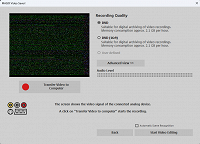
When transferring, I get weird lines but it seems these are displayed doing the transferring only, I don't see this once I play the files later. Is this something I need to try to solve or is it fine given that I see no such lines in the final product?

As has happened in the past with Magix (I don't think I have mentioned it), I am getting sync issues at the start of recordings which then fixes itself often the first minute into the recording. I don't want recordings where the first minute or so is badly synced. I try and fix it by going to Effects, Set sound/image offset and sometimes I can do this in a satisfactory way, but sometimes even this doesn't even work as a workaround. So is there a way to not have to deal with these sync issues when using Magix or am I better of using some other software?


AAProds wrote on 11/3/2026, 11:40 PM

@Stefan-Trngren

Re the sync, I'm not a whizz on VideoEasy but you could try starting recording first, then start playing your tape.

Also, try changing the recording from DVD to User Defined. That will produce a lossless Magix MXV-format file.

In my experience, audio desync is normally constant throughout, so it is odd that you're getting a lot only at the start.

As for external programs to record, there are many options, depending on how "good" you want the final result to be. Magix is limited to either MPEG ("DVD") or MXV. MXV, while good quality, cannot be read by any other program.

If you're getting into this is a big way, from a editing POV, you'll find Video Deluxe (or VPX) to be light-years ahead of VideoEasy. At the prices Magix are offering for VDL, I don't know why VideoEasy even exists. VDL has many more editing options, has true NLE timeline (s, yes multiple movies/timelines in one project) and you can get plugins such as Neat Video, which is probably the killer denoiser in the consumer space.


All my forum comments are based on or refer to my System 1.

System 1

Windows 11 v23H2 severely modified by Openshell and ExplorerPatcher

Power supply: 850W Cooler Master (should have got modular)

CPU: Intel i7 13700K running at 3400mhz, cooled by a Kraken 2x140mm All In One liquid cooler.

RAM: 64gb (2x32gb sticks) G.Skill "Ripjaws" DDR4 3200Mhz

GPU 1: iGPU UHD 770

GPU 2: NVidia RTX 3060Ti Windforce 8gb

C drive: NVME 500gb

Bluray Burner: Pioneer BDR-212D

Various other SSD and HDDs.

Monitor: 27"/68cm Samsung, 2560 x 1440, 43 pixels/cm.

MEP 2021 version 20.0.1.80

Magix Video Deluxe 2026 Ultimate (although it comes up as "Premium").

Magix Video Easy version 7.0.1.145

System 2

(Still in use for TV and videotape capture)

Windows 10 Home Version 2009

CPU: i5-750 at 2670mhz with 12gb RAM

Onboard IEEE1394 (Firewire) port

GPU: ATI Radeon HD 4770 (512mb) which is ignored by MEP

Hard drives: C Drive 256gb SSD, various other HDDs.

Monitor: Dell 22"/56cm, 1680x1050, 35 pixels/cm

Movie Studio 2023

Movie Studio 2024

VPX 12

System 3

Lenovo Yoga laptop

Windows 11

CPU i5-8250U (1,6ghz)

8GB DDR4 2400 RAM

GPU iGPU UHD620

2TB NVME HDD

Video Deluxe 2026

Stefan-Trngren wrote on 11/7/2026, 8:57 AM

I ended up upgrading to Video Deluxe, they had a good Black Friday offer. Starting recording in magix for a minute and then hitting play on my VCR has helped significantly with the sync issues. I'm recording in MXV now as well. These changes seem to have solved all the various issues I previously had so let's hope it stays that way. Thanks for all your help, AAProds.

AAProds wrote on 11/8/2026, 7:23 AM

@Stefan-Trngren

Pleasing to hear, Stephan, happy editing!

All my forum comments are based on or refer to my System 1.

System 1

Windows 11 v23H2 severely modified by Openshell and ExplorerPatcher

Power supply: 850W Cooler Master (should have got modular)

CPU: Intel i7 13700K running at 3400mhz, cooled by a Kraken 2x140mm All In One liquid cooler.

RAM: 64gb (2x32gb sticks) G.Skill "Ripjaws" DDR4 3200Mhz

GPU 1: iGPU UHD 770

GPU 2: NVidia RTX 3060Ti Windforce 8gb

C drive: NVME 500gb

Bluray Burner: Pioneer BDR-212D

Various other SSD and HDDs.

Monitor: 27"/68cm Samsung, 2560 x 1440, 43 pixels/cm.

MEP 2021 version 20.0.1.80

Magix Video Deluxe 2026 Ultimate (although it comes up as "Premium").

Magix Video Easy version 7.0.1.145

System 2

(Still in use for TV and videotape capture)

Windows 10 Home Version 2009

CPU: i5-750 at 2670mhz with 12gb RAM

Onboard IEEE1394 (Firewire) port

GPU: ATI Radeon HD 4770 (512mb) which is ignored by MEP

Hard drives: C Drive 256gb SSD, various other HDDs.

Monitor: Dell 22"/56cm, 1680x1050, 35 pixels/cm

Movie Studio 2023

Movie Studio 2024

VPX 12

System 3

Lenovo Yoga laptop

Windows 11

CPU i5-8250U (1,6ghz)

8GB DDR4 2400 RAM

GPU iGPU UHD620

2TB NVME HDD

Video Deluxe 2026