Video Saver 8.0.0.28, issues with importing videos

Stefan-Trngren wrote on 8/5/2026, 8:41 AM

As of today I am having issues with importing videos from analogue sources.

I have not had these issues before and use this program daily. What I noticed today was that five minutes into a recording the recording would freeze while the tape was still playing on the VCR.

I tried again but with different results, either that would happen again (and now the freezing starts immediately and not 5 minutes in), or I would get a black screen or a black and green screen, see image
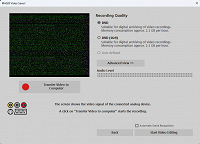
I uninstalled and reinstalled the program, that didn't help. And I have tried different tapes.

Any idea what's wrong?

I don't know if related, but I have had other issues with the program lately mentioned here. With that I didn't encounter any issues with the importing itself but when I would save it the files would go corrupted a little under half the time.



Comments

johnebaker wrote on 8/5/2026, 10:06 AM

@Stefan-Trngren

Hi

I have closed you original post on the import 'corruption issue' to avoid split responses on what is the same issue.

We need more information to help diagnose the issue(s) you are having:

The specification of your computer system including Windows version and program version, see this topic for what is required and please quote processor and graphics card make/model in full, and also what monitor/screen resolution(s) you are working with if this is a laptop.

I would suggest you put this information in your profile signature so we do not have to keep asking for it.

Are the graphics card/integrated GPU drivers up to date?

A screen shot of the Program settings, would help.

What device are you recording from and do you have the Video standard, PAL or NTSC, set to match that of the device you are recording from?

What changes occurred between working and the issues you are now having?

In the Windows settings, Privacy & Security, App permissions section (scroll down) Microphone and Camera options, check both for the options Let desktop apps access your microphone/camera (scroll down) is set to on.

John EB
Forum Moderator

Last changed by johnebaker on 8/5/2026, 10:11 AM, changed a total of 2 times.

VPX 17, Video deluxe 2026, and earlier versions MEP 2015 and 2016, Music Maker Premium 2026.

PC - running Windows 11 25H2 Professional on Intel i7-8700K 3.2 GHz, 16GB RAM, RTX 2060 6GB 192-bit GDDR6, 1 x 1Tb Sabrent NVME SSD (OS and programs), 2 x 4TB (Data) internal HDD + 1TB internal SSD (Work disc), + ext backup HDDs.

Laptop - Lenovo Legion 5i Phantom - running Windows 11 25H2 on Intel Core i7-10750H, 16GB DDR4-SDRAM, 512GB SSD, 43.9 cm screen Full HD 1920 x 1080, Intel UHD 630 iGPU and NVIDIA GeForce RTX 2060 (6GB GDDR6)

Sony FDR-AX53e Video camera, DJI Osmo Action 3 and Sony HDR-AS30V Sports cams.